Buying or selling a vehicle in Kenya doesn't end when money changes hands. The final and most important step is transferring ownership through the NTSA eCitizen portal. Until the transfer is complete, the vehicle legally remains registered under the seller's name, which can expose both parties to unnecessary risks.
📋 NTSA Vehicle Ownership Transfer at a Glance
| Item | Details |
| Application | Online |
| Platform | eCitizen & NTSA Service Portal |
| Seller Action | Initiates Transfer |
| Buyer Action | Accepts Transfer |
| Processing Time | Approximately 3 Working Days |
| Tracking | Application ID |
| Charges | Depends on Engine Capacity (CC) |
| Resubmission After Rejection | Free |
| Logbook Collection | Selected NTSA Centre |
The good news is that NTSA has digitized the entire ownership transfer process. Today, buyers and sellers can complete most of the application online without visiting an NTSA office, making the process faster, more transparent, and easier to track.
Need Help Transferring a Vehicle?
Stuck with an NTSA/eCitizen vehicle ownership transfer? Monolith can guide the buyer and seller through the online process.
Assistance from KSh 500.
Call James Nginya 0717133839
Monolith Africa is an independent assistance service and is not affiliated with NTSA or eCitizen. Government charges, where applicable, are separate.
Why Vehicle Ownership Transfer Is Important
Transferring ownership protects both the buyer and the seller.
For the buyer, it confirms legal ownership of the vehicle. For the seller, it removes responsibility for future offences, accidents, traffic fines, or liabilities associated with the vehicle.
Before purchasing any used vehicle, NTSA advises buyers to first conduct a motor vehicle search and obtain a Copy of Records. This document provides important information about the vehicle and helps buyers make informed decisions before completing the purchase.
John Deere 2130 Tractor for Sale in Kenya (2026): Price, Specifications & Buying Guide
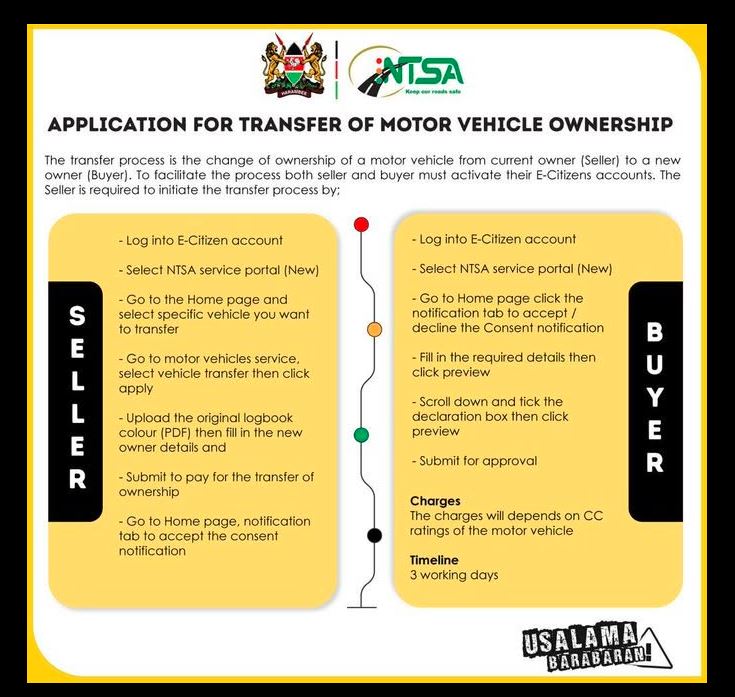
Step 1: Seller Initiates the Transfer
The transfer process begins with the current owner.
The seller should:
- Log into their eCitizen account.
- Open the NTSA Service Portal.
- Select the vehicle to be transferred.
- Choose Vehicle Transfer.
- Upload the original logbook (PDF) and enter the new owner's details.
- Submit the application and pay the applicable transfer charges.
Once submitted, the system automatically sends a notification to the buyer.
Step 2: Buyer Accepts the Transfer
The buyer then logs into their eCitizen account to complete the process.
The buyer should:
- Open the NTSA Service Portal.
- Check the notifications section.
- Accept the ownership transfer request.
- Confirm the submitted details.
- Tick the declaration box.
- Submit the application for approval.
The transfer application is then forwarded to NTSA for verification.
Kenyatta Avenue Nairobi (2026 Guide): History, Landmarks, Businesses & Things to Do
How Long Does NTSA Ownership Transfer Take?
NTSA states that once the application has been approved, the new logbook is processed within approximately three working days.
After processing, the new owner can collect the logbook from the selected collection centre using:
- The previous logbook.
- An original identification document.
Need Help Transferring a Vehicle?
Stuck with an NTSA/eCitizen vehicle ownership transfer? Monolith can guide the buyer and seller through the online process.
Assistance from KSh 500.
Call James Nginya 0717133839
Monolith Africa is an independent assistance service and is not affiliated with NTSA or eCitizen. Government charges, where applicable, are separate.
How Much Does Ownership Transfer Cost?
Unlike many NTSA services, vehicle transfer charges are not fixed.
The amount payable depends on the engine capacity (CC rating) of the vehicle.
Generally, vehicles with larger engines attract higher transfer fees than those with smaller engines.
Can You Track Your Application?
Yes.
Every ownership transfer application generates a unique Application ID, allowing both the buyer and seller to monitor progress online.
This improves transparency and reduces uncertainty during the approval process.
What Happens If the Transfer Is Rejected?
Sometimes an application may be rejected due to incorrect information or missing documents.
If this happens:
- NTSA sends an SMS explaining the reason for rejection.
- The applicant can correct the issue.
- The application can be resubmitted without paying another application fee.
Important Things to Remember
How to Buy Cars from World Navi Kenya (2026): Step-by-Step Guide for Importing from Japan
Before buying or selling a vehicle:
- Conduct a Copy of Records search.
- Ensure the seller initiates the transfer.
- The buyer must accept the transfer online.
- Keep your Application ID for tracking.
- Never pay anyone claiming they can "fast-track" the process.
- Complete the ownership transfer within 14 days, as required by the Traffic Act.