3-Minute Blog Read
How to Add an Organization or Company to the NTSA TIMS Account in Kenya (2026 Guide)
If your company owns vehicles in Kenya, you'll need to register your organization on the NTSA TIMS (Transport Integrated Management System) before accessing services such as vehicle inspections, ownership transfers, duplicate logbooks, and other motor vehicle transactions.
Many business owners ask:
"How do I book NTSA services for a company-owned vehicle?"
The answer is simple—you must first add your organization to the NTSA platform.
Why Register Your Organization on NTSA?
Unlike privately owned vehicles, company vehicles are managed through an organization account rather than an individual's TIMS account.
Once your organization has been successfully added, you'll be able to:
- Book vehicle inspections.
- Transfer company-owned vehicles.
- Apply for duplicate logbooks.
- Access vehicle records.
- Manage multiple vehicles under one account.
- Perform other NTSA motor vehicle services.
This makes fleet management easier for businesses, NGOs, SACCOs, schools, and government institutions.
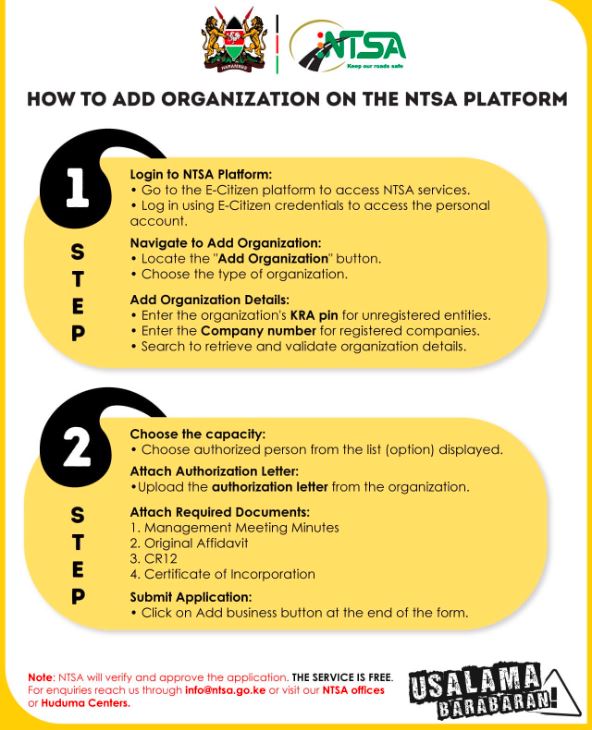
How to Add an Organization to NTSA TIMS
The process generally involves:
Step 1: Log in to NTSA TIMS
Visit the NTSA TIMS portal using your existing account.
Step 2: Select "Add Organization"
Navigate to the organization management section and choose the option to register a new organization.
Step 3: Enter Company Details
Provide the required information, including:
- Registered company name
- Registration number
- KRA PIN
- Official email address
- Company contacts
- Physical address
Ensure all information matches your official business registration documents.
Step 4: Upload Supporting Documents
Depending on the organization type, NTSA may require documents such as:
- Certificate of Incorporation
- CR12 (where applicable)
- KRA PIN Certificate
- Identification documents for authorized officials
- Board resolution or authorization letter where required
Step 5: Submit for Verification
Once submitted, NTSA reviews the application before activating the organization account.
After approval, the organization can begin managing its vehicles through the NTSA platform.
Booking Inspection for Company Vehicles
If your vehicle is registered under a company, do not attempt to book inspection using a personal account.
Instead, log into the organization account and complete the booking from there. This ensures the inspection record is correctly linked to the registered vehicle owner.
Common Mistakes to Avoid
Many businesses experience delays because they:
- Try using personal NTSA accounts for company vehicles.
- Upload incomplete registration documents.
- Use incorrect company details.
- Fail to assign authorized organization administrators.
Double-checking your information before submission can save valuable time.