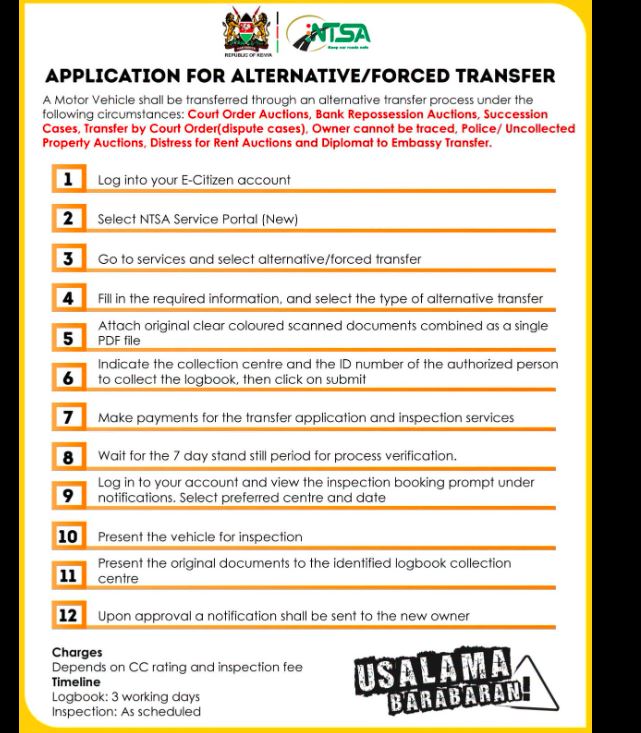
Buying or inheriting a vehicle doesn't always follow the normal transfer process. Sometimes the registered owner cannot be traced, the vehicle has been repossessed by a bank, sold through an auction, or transferred through a court order.
To cater for such situations, the National Transport and Safety Authority (NTSA) provides an Alternative/Forced Transfer service through the NTSA Service Portal. This process allows ownership to be legally transferred after verification and inspection.
Here's everything you need to know.
What Is an Alternative/Forced Vehicle Transfer?
An Alternative (Forced) Transfer is a special ownership transfer procedure used when the normal seller-to-buyer online transfer cannot be completed.
Instead of the registered owner initiating the transfer, NTSA verifies supporting legal documents before approving the new owner.
This ensures the vehicle changes ownership legally while protecting both buyers and previous owners from fraudulent transfers.
When Is an Alternative/Forced Transfer Required?
You can apply for an Alternative/Forced Transfer under the following circumstances:
- Court ordered vehicle transfer
- Vehicle sold through a court auction
- Bank repossession auction
- Succession or inheritance cases
- Owner cannot be traced
- Police or uncollected property auctions
- Distress for rent auctions
- Embassy or diplomatic vehicle transfers
- Other legally approved ownership disputes
Step-by-Step NTSA Alternative/Forced Transfer Process
Step 1: Log into Your eCitizen Account
Visit the eCitizen portal and sign in using your account credentials.
Step 2: Open the NTSA Service Portal
After logging in, select the NTSA Service Portal (New).
Step 3: Select Alternative/Forced Transfer
Navigate to Services and choose Alternative/Forced Transfer.
Step 4: Fill in the Application
Provide all the required information including:
- Vehicle registration number
- Applicant details
- Type of forced transfer
- Supporting legal information
Ensure all details match your supporting documents.
Step 5: Upload Supporting Documents
Scan all original documents in colour and combine them into one PDF file before uploading.
Depending on your application, these may include:
- Court order
- Auction documents
- Letters of administration
- Grant of probate
- Sale agreement
- Bank repossession documents
- National ID
- KRA PIN
- Other supporting evidence
Incomplete documentation may delay approval.
Step 6: Select the Logbook Collection Centre
Choose the NTSA office where you wish to collect the new logbook.
You'll also provide the ID number of the authorised person collecting it.
Step 7: Pay the Required Fees
Pay the applicable charges through eCitizen.
The amount depends on:
- Vehicle engine capacity (CC rating)
- Vehicle inspection fees
- Applicable NTSA transfer charges
Step 8: Wait for the 7-Day Verification Period
NTSA places the application under a mandatory 7-day standstill period.
During this period:
- Documents are verified
- Objections can be raised
- Ownership records are checked
Step 9: Book Vehicle Inspection
Once verification is complete, you'll receive an inspection booking notification.
Select:
- Preferred inspection centre
- Inspection date
Step 10: Present the Vehicle for Inspection
Take the vehicle to the selected inspection centre.
Inspectors verify:
- Chassis number
- Engine number
- Vehicle identity
- Roadworthiness where applicable
Step 11: Present Original Documents
Carry all original documents to the designated NTSA logbook collection centre for verification.
Step 12: Receive Approval
Once approved, NTSA notifies the new owner.
The logbook is then processed and issued in the new owner's name.
Required Documents
Although requirements vary depending on the reason for transfer, applicants should prepare:
| Document | Required |
| National ID | ✔ |
| KRA PIN | ✔ |
| Court Order (if applicable) | ✔ |
| Auction Documents | ✔ |
| Letters of Administration | ✔ |
| Grant of Probate | ✔ |
| Sale Agreement | Where applicable |
| Vehicle Logbook | If available |
| Other supporting documents | As required |
How Long Does the Process Take?
Typical timelines include:
- Verification period: 7 days
- Logbook processing: Approximately 3 working days after approval
- Vehicle inspection: According to booked appointment
Actual processing times may vary depending on document verification.